
136 lines
5.9 KiB
Markdown
136 lines
5.9 KiB
Markdown
# Deck
|
|
|
|
[](https://travis-ci.org/nextcloud/deck) [](https://codecov.io/github/nextcloud/deck) [](https://www.codacy.com/app/juliushaertl/deck?utm_source=github.com&utm_medium=referral&utm_content=nextcloud/deck&utm_campaign=Badge_Grade) [](https://scrutinizer-ci.com/g/nextcloud/deck/?branch=master) [](https://webchat.freenode.net/?channels=nextcloud-deck)
|
|
|
|
|
|
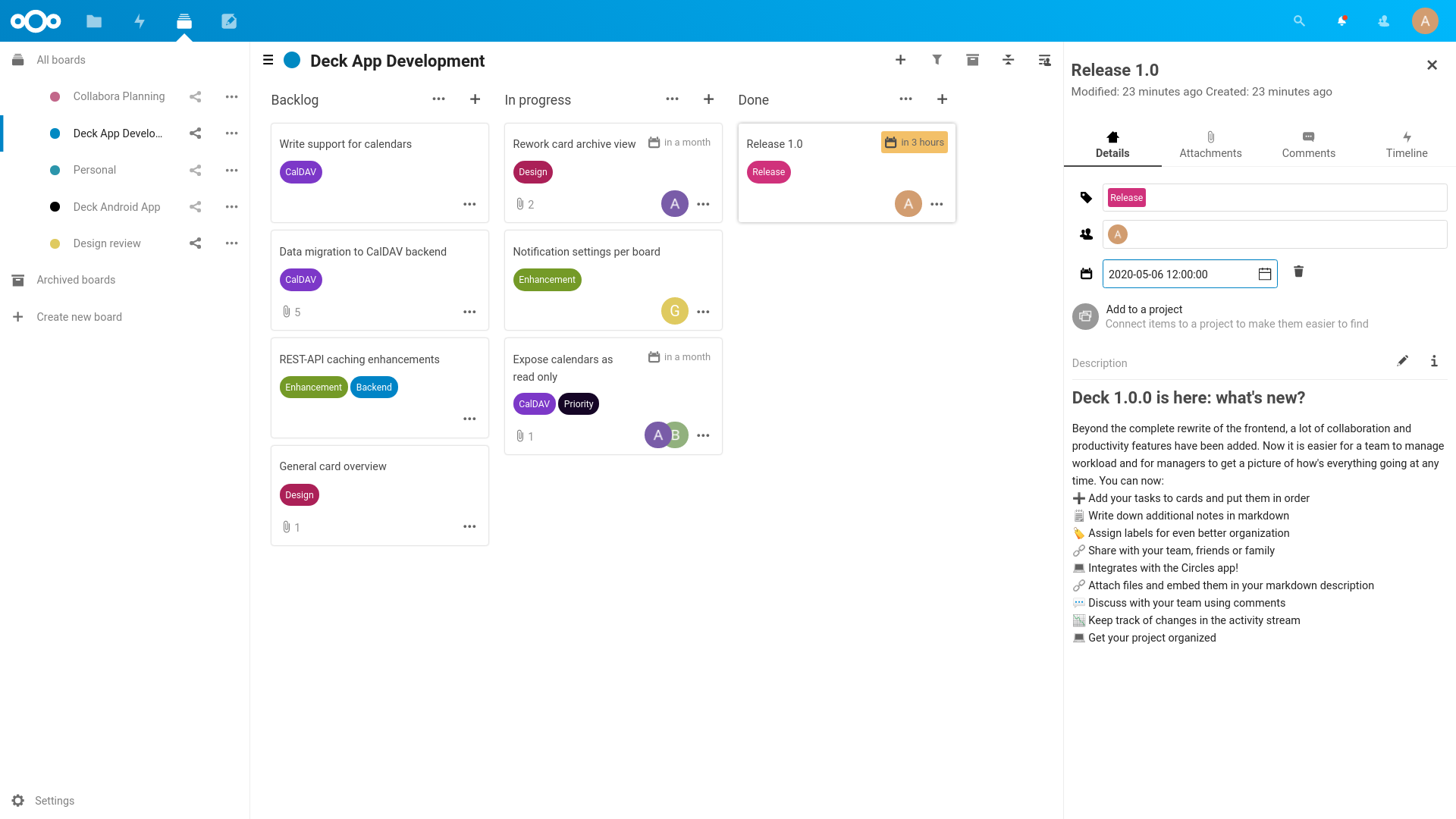
Deck is a kanban style organization tool aimed at personal planning and project organization for teams integrated with Nextcloud.
|
|
|
|
- Add your tasks to cards and put them in order
|
|
- Write down additional notes in markdown
|
|
- Assign labels for even better organization
|
|
- Share with your team, friends or family
|
|
- Integrates with the [Circles](https://github.com/nextcloud/circles) app!
|
|
- Attach files and embed them in your markdown description
|
|
- Discuss with your team using comments
|
|
- Keep track of changes in the activity stream
|
|
- Get your project organized
|
|
|
|
|
|
|
|
### Mobile apps
|
|
|
|
- [Nextcloud Deck app for Android](https://github.com/stefan-niedermann/nextcloud-deck) - It is available in [F-Droid](https://f-droid.org/de/packages/it.niedermann.nextcloud.deck/) and the [Google Play Store](https://play.google.com/store/apps/details?id=it.niedermann.nextcloud.deck.play)
|
|
|
|
### 3rd-Party Integrations
|
|
|
|
- [trello-to-deck](https://github.com/maxammann/trello-to-deck) - Migrates cards from Trello
|
|
- [mail2deck](https://github.com/newroco/mail2deck) - Provides an "email in" solution
|
|
- [A-deck](https://github.com/leoossa/A-deck) - Chrome Extension that allows to create new card in selected stack based on current tab
|
|
|
|
## Installation/Update
|
|
|
|
This app is supposed to work on the two latest Nextcloud versions.
|
|
|
|
### Install latest release
|
|
|
|
You can download and install the latest release from the [Nextcloud app store](https://apps.nextcloud.com/apps/deck)
|
|
|
|
### Install from git
|
|
|
|
If you want to run the latest development version from git source, you need to clone the repo to your apps folder:
|
|
|
|
```
|
|
git clone https://github.com/nextcloud/deck.git
|
|
cd deck
|
|
make install-deps
|
|
make build
|
|
```
|
|
|
|
Please make sure you have installed the following dependencies: `make, which, tar, npm, curl, composer`
|
|
|
|
### Install the nightly builds
|
|
|
|
Instead of setting everything up manually, you can just [download the nightly build](https://github.com/nextcloud/deck/releases/tag/nightly) instead. These builds are updated every 24 hours, and are pre-configured with all the needed dependencies.
|
|
|
|
## Developing
|
|
|
|
### PHP
|
|
|
|
Nothing to prepare, just dig into the code.
|
|
|
|
### JavaScript
|
|
|
|
Deck requires running a `make build-js` to install npm dependencies and build the JavaScript code using webpack. While developing you can also use `make watch` to rebuild everytime the code changes.
|
|
|
|
#### Hot reloading
|
|
|
|
Enable debug mode in your config.php `'debug' => true,`
|
|
|
|
Without SSL:
|
|
```
|
|
npx webpack-dev-server --config webpack.hot.js \
|
|
--public localhost:3000 \
|
|
--output-public-path 'http://localhost:3000/js/'
|
|
```
|
|
|
|
With SSL:
|
|
```
|
|
npx webpack-dev-server --config webpack.dev.js --https \
|
|
--cert ~/repos/nextcloud/nc-dev/data/ssl/nextcloud.local.crt \
|
|
--key ~/repos/nextcloud/nc-dev/data/ssl/nextcloud.local.key \
|
|
--public nextcloud.local:3000 \
|
|
--output-public-path 'https://nextcloud.local:3000/js/'
|
|
```
|
|
|
|
|
|
### Running tests
|
|
You can use the provided Makefile to run all tests by using:
|
|
|
|
make test
|
|
|
|
### Documentation
|
|
|
|
The documentation for our REST API can be found at https://deck.readthedocs.io/en/latest/API/
|
|
|
|
## Contribution Guidelines
|
|
|
|
Please read the [Code of Conduct](https://nextcloud.com/community/code-of-conduct/). This document offers some guidance to ensure Nextcloud participants can cooperate effectively in a positive and inspiring atmosphere, and to explain how together we can strengthen and support each other.
|
|
|
|
For more information please review the [guidelines for contributing](https://github.com/nextcloud/server/blob/master/.github/CONTRIBUTING.md) to this repository.
|
|
|
|
### Apply a license
|
|
|
|
All contributions to this repository are considered to be licensed under
|
|
the GNU AGPLv3 or any later version.
|
|
|
|
Contributors to the Deck app retain their copyright. Therefore we recommend
|
|
to add following line to the header of a file, if you changed it substantially:
|
|
|
|
```
|
|
@copyright Copyright (c) <year>, <your name> (<your email address>)
|
|
```
|
|
|
|
For further information on how to add or update the license header correctly please have a look at [our licensing HowTo][applyalicense].
|
|
|
|
### Sign your work
|
|
|
|
We use the Developer Certificate of Origin (DCO) as a additional safeguard
|
|
for the Nextcloud project. This is a well established and widely used
|
|
mechanism to assure contributors have confirmed their right to license
|
|
their contribution under the project's license.
|
|
Please read [developer-certificate-of-origin][dcofile].
|
|
If you can certify it, then just add a line to every git commit message:
|
|
|
|
````
|
|
Signed-off-by: Random J Developer <random@developer.example.org>
|
|
````
|
|
|
|
Use your real name (sorry, no pseudonyms or anonymous contributions).
|
|
If you set your `user.name` and `user.email` git configs, you can sign your
|
|
commit automatically with `git commit -s`. You can also use git [aliases](https://git-scm.com/book/tr/v2/Git-Basics-Git-Aliases)
|
|
like `git config --global alias.ci 'commit -s'`. Now you can commit with
|
|
`git ci` and the commit will be signed.
|
|
|
|
[dcofile]: https://github.com/nextcloud/server/blob/master/contribute/developer-certificate-of-origin
|
|
[applyalicense]: https://github.com/nextcloud/server/blob/master/contribute/HowToApplyALicense.md
|